
Stop losing placements to a spreadsheet
Your catalog, finally organized.
Your pitches, finally tracked.
One subscription, starting at $6.95/mo

Composer Catalog is where you tag every track's metadata, build playlists, and send trackable pitches to supervisors and publishers — all from one place, on any device. Built for composers, by a composer.
- Full online database with advanced track filtering and exporting
- Option to write metadata directly into your audio files
- Build playlists and send fully branded, trackable pitches — all in one place
Scroll down to learn more about Composer Catalog and how it can help you organize your catalog, pitch with confidence, and never lose track of a placement again.
Plans start at $6.95/mo
Try it free for 30 days!

"Finally, ONE catalog system that understands how
composers actually work."
You didn't get into music to manage five subscriptions
Most composers end up with a cataloging tool, a separate pitching platform, a file-sharing account, and a spreadsheet holding it all together — each with its own login, its own monthly fee, and its own gaps. Composer Catalog replaces all of it — one subscription, one searchable home for every track, contract, contact, playlist, and pitch you've ever sent.
Metadata
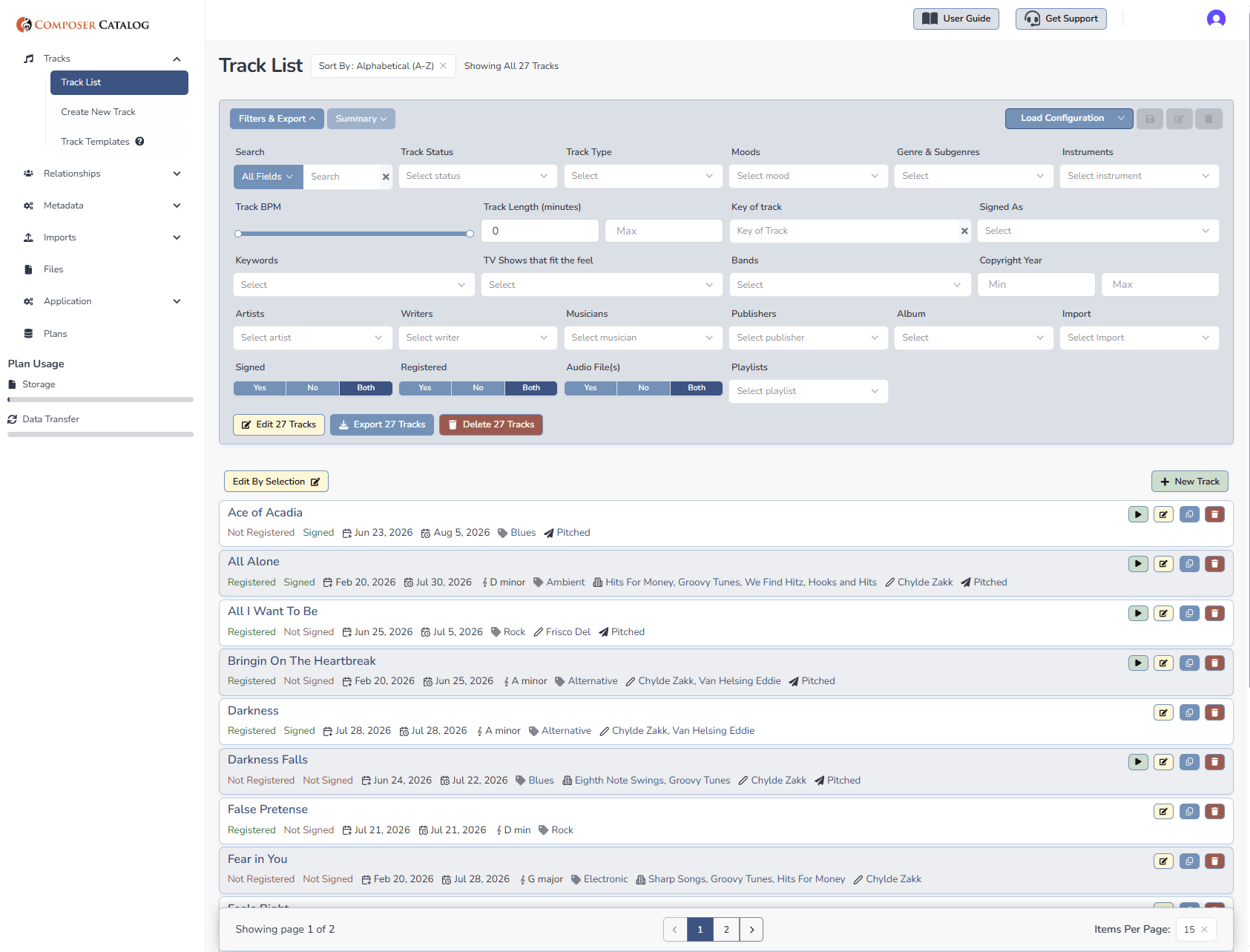
Know everything about every track, instantly
Tag key, BPM, mood, genre, sound-alikes, exclusivity status, reversion dates, and every writer or publisher attached — the more you tag, the more your catalog tells you at a glance. Composer Catalog can even write that metadata directly into the audio file itself, so title, genre, and your contact info travel with the track the moment it's downloaded. Works with MP3 and AIF, and you choose what's included per pitch.
Playlists
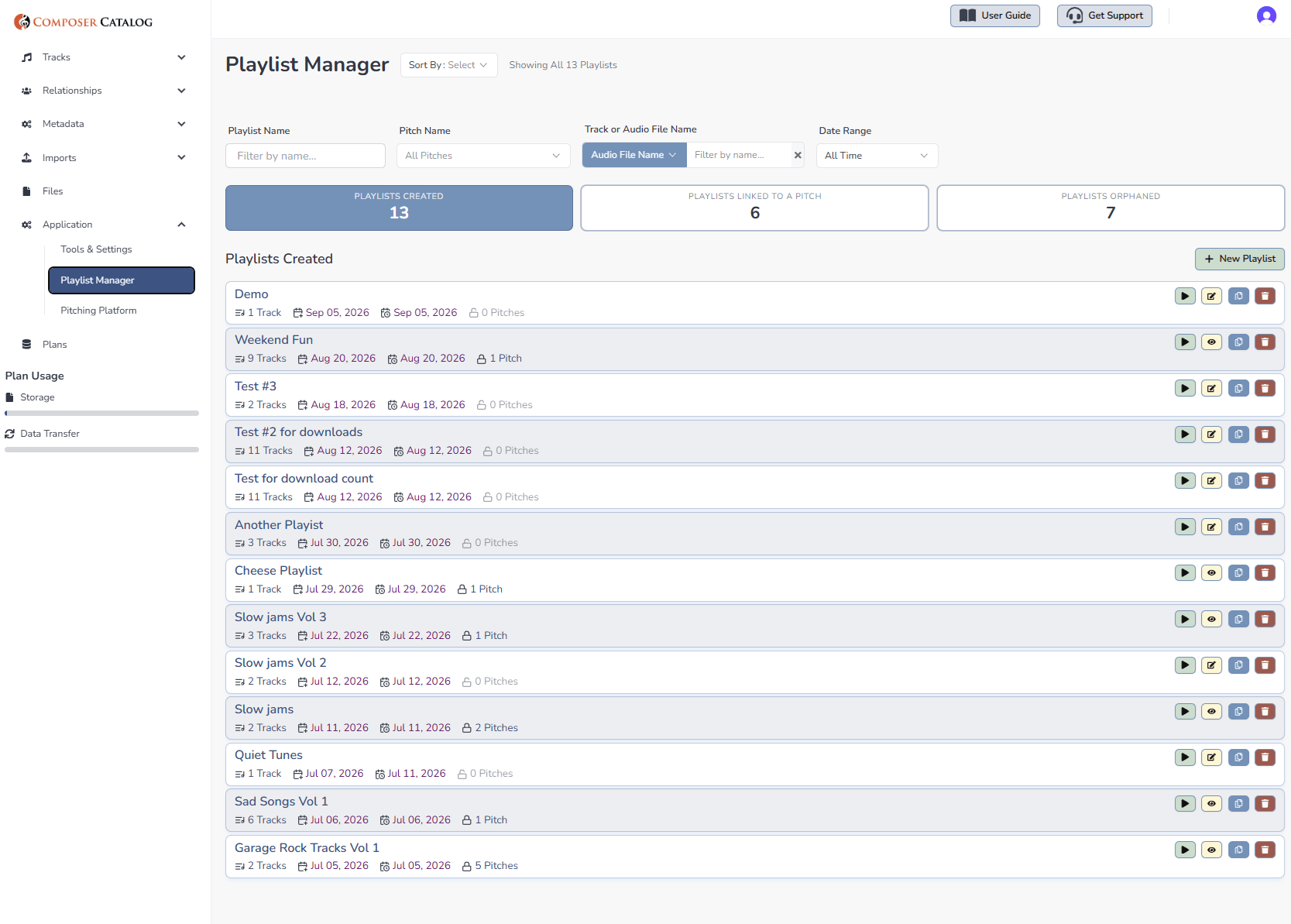
Built from tracks that you have already tagged
Pull from your Master Track List or File section, choosing the exact audio file per track — main mix, alternate, or stem. Reorder with drag-and-drop, duplicate an existing playlist for a new brief, and filter every playlist by name, pitch, or status. Change something about a track in Composer Catalog? Guess what, that piece of data has been updated in your playlist (if applicable)
Pitching
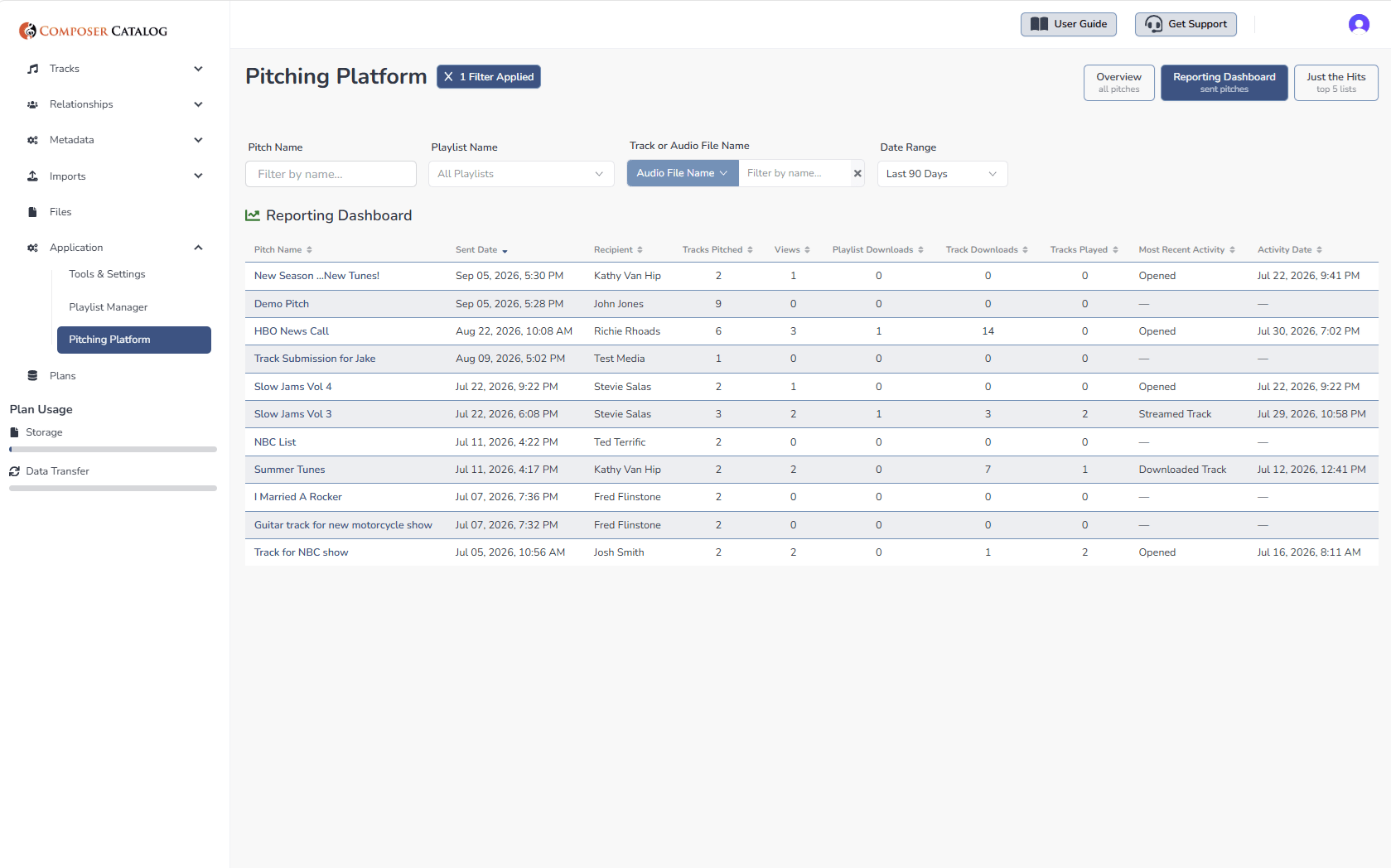
Pitch with your own brand, not a Dropbox link
Your logo, your image, your socials, your video — sent as a page the recipient sees, not a folder of files. Password-protect it, expire it after a set date, and preview exactly what they'll see before you send. Once it's out the door, a full reporting dashboard tells you the moment it's opened, a track is streamed, or a file is downloaded — so you're never left wondering if anyone looked.
Reporting
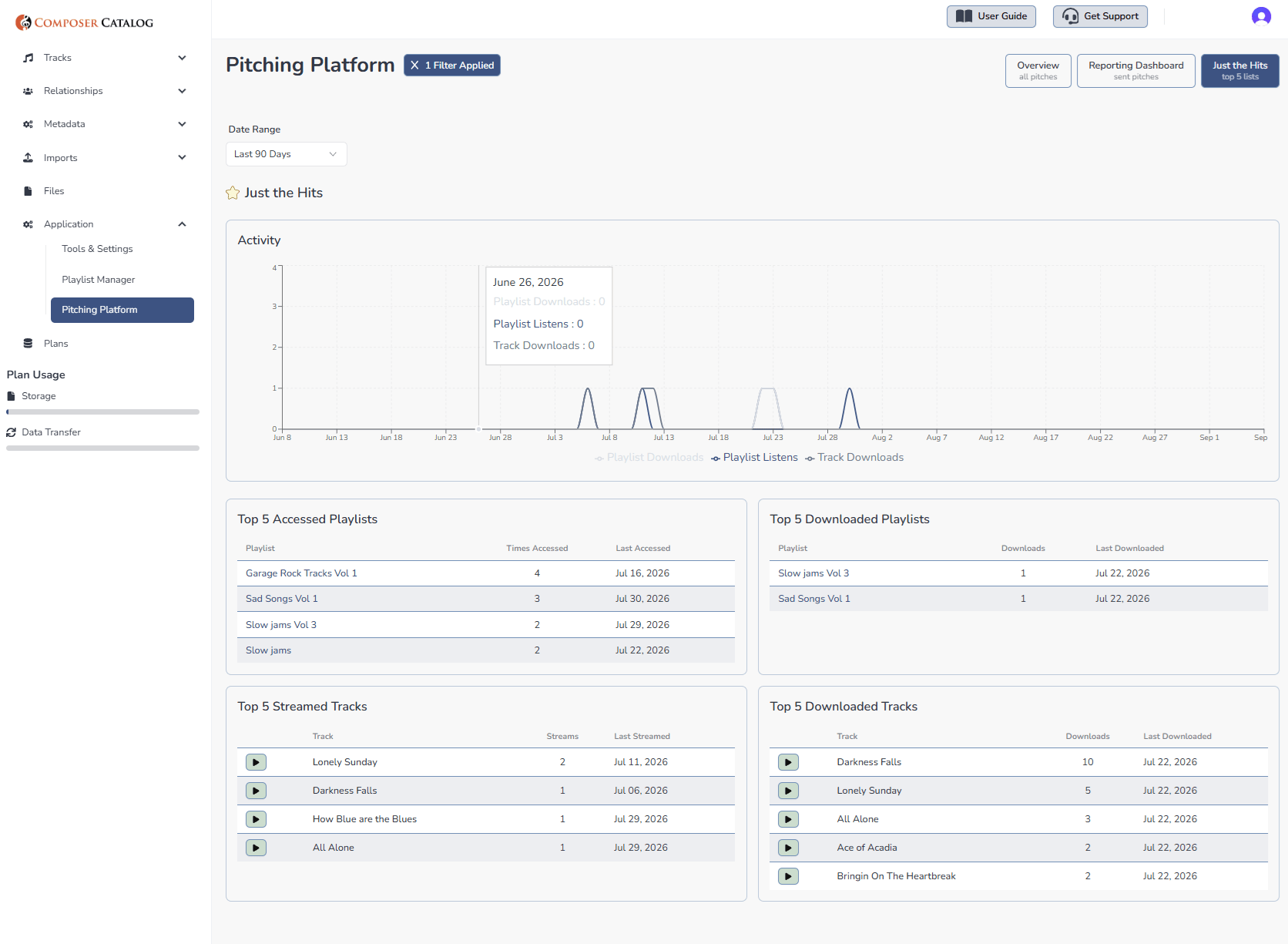
See what is actually landing
Top-five dashboards surface your most-accessed playlists and most-downloaded tracks, so you always know what's resonating. Filter by date range — last 30, 60, or 90 days, or set your own — and click straight through to any playlist or track for the full picture.
Who Is This For?
- TV/Film composers
- Sync composers
- Production music writers
- Trailer composers
- Game composers
- ...or any composer managing a growing catalog
What It Solves
- Metadata scattered across spreadsheets and sticky notes
- Paying for a separate cataloging tool, pitching platform, and file-sharing account
- Building a playlist by hand for every single submission
- Sending a pitch and never knowing the status
- No single place that knows your entire catalog
Ready To See Your Entire Catalog In One Place?
30 days free. Every feature unlocked.
No credit card required.

Advanced Metadata
Composer Catalog allows you to tag advanced metadata to your tracks. Examples include: registration or signing status, key, beats per minute, lyrics, track description, moods, instruments used, TV shows that match the feel, sound-alike bands, exclusivity status (non-exclusive/exclusive), genre, and contributing composers, publishers, or musicians. Composer Catalog makes a great track metadata organizer.

Track Management
Composer Catalog helps you keep track of all writers, publishers, and session musicians associated with each track in your catalog. You can save contact information for instant access. If you have contracts or audio files you'd like to attach to a track, you can do that too. Having your audio files readily available will be useful when you want to pitch them to music supervisors or publishers.

Custom Playlists
Composer Catalog's Playlist Manager lets you build custom playlists from your Master Track List or File section, right down to choosing specific audio files per track. Drag and drop to reorder, or duplicate an existing playlist to quickly build a new one for a different pitch. Every playlist shows track count, dates, and pitch status in one place, with filtering by name, date, or status. Once built, your playlist is ready to pitch instantly.

Pitching Platform
Composer Catalog lets you send any playlist as a fully branded, trackable pitch to a supervisor, publisher, or collaborator. Add your logo, artist image, social links, even a video, and name the playlist to match exactly what they're looking for. Set a password, an expiration date, and choose stream-only or downloadable access. A built-in reporting dashboard tells you the moment your pitch is opened, streamed, or downloaded.

Search Capability
Composer Catalog allows you to search using any metadata you've entered for a track. The more detail you provide, the more refined your searches will be. When a publisher requests tracks that sound like “insert hip band here,” you’ll be able to find results instantly. It's like having your own composer music library manager! All search results can be exported to PDF or Excel.

Write Metadata in Files
Composer Catalog writes your track's metadata directly into the physical audio file — title, genre, mood, artist, publisher, and contact info, automatically embedded the moment a track is downloaded. No manual entry, no extra steps. This works for formats that support embedded tags, like MP3 and AIF. You're also in control of what's included — for non-exclusive or one-off deals, you can leave out publisher info so the file doesn't imply the wrong relationship.
Custom Exports
Composer Catalog lets you export your catalog exactly the way you need it. Filter by any field — genre, exclusivity, sound-alikes, and more — then choose exactly which columns to include before exporting. Whether you're pulling together a quick submission list or a full catalog report, exports are available in PDF or Excel format, giving you a clean, professional document ready to send whenever a sync opportunity comes your way.
Easy Track Entry
Composer Catalog Online offers multiple ways to add tracks to your library. Manually input track data, build reusable templates to cut down on repetitive typing, or duplicate an existing track already in your system. When you duplicate a track, all metadata carries over — everything except the track name, attached documents, and audio files — so you can build out your catalog quickly, without losing flexibility.
Desktop Upgrade
Upgrading from the Composer Catalog desktop version is seamless — export your existing database from the desktop app, then drag and drop the file directly into your browser. The online platform automatically recognizes it and imports your tracks, metadata, and associated details. Migrating from a spreadsheet or another system entirely? Composer Catalog also supports importing via a properly formatted CSV file.
Get Organized...
Stay Organized
Composer Catalog Software for Professional Composers | Organize Tracks, Metadata & Sync Assets

Metadata You Can Track
with Composer Catalog
Track Status
Moods
Genres/Sub-Genres
Writers
Session Musicians
Publishers
Publishing deals that any track is signed to
Deal type (non-exclusive, exclusive, WFH)
Alternate Track Title
Reversion Date
Instruments Used
BPM
Track Length
Key of Track
Keywords
TV shows that sound alike
Bands that sound similar
Album name
Comments
Upload audio files to any track
Upload any documents/contracts & link to any track
And more!
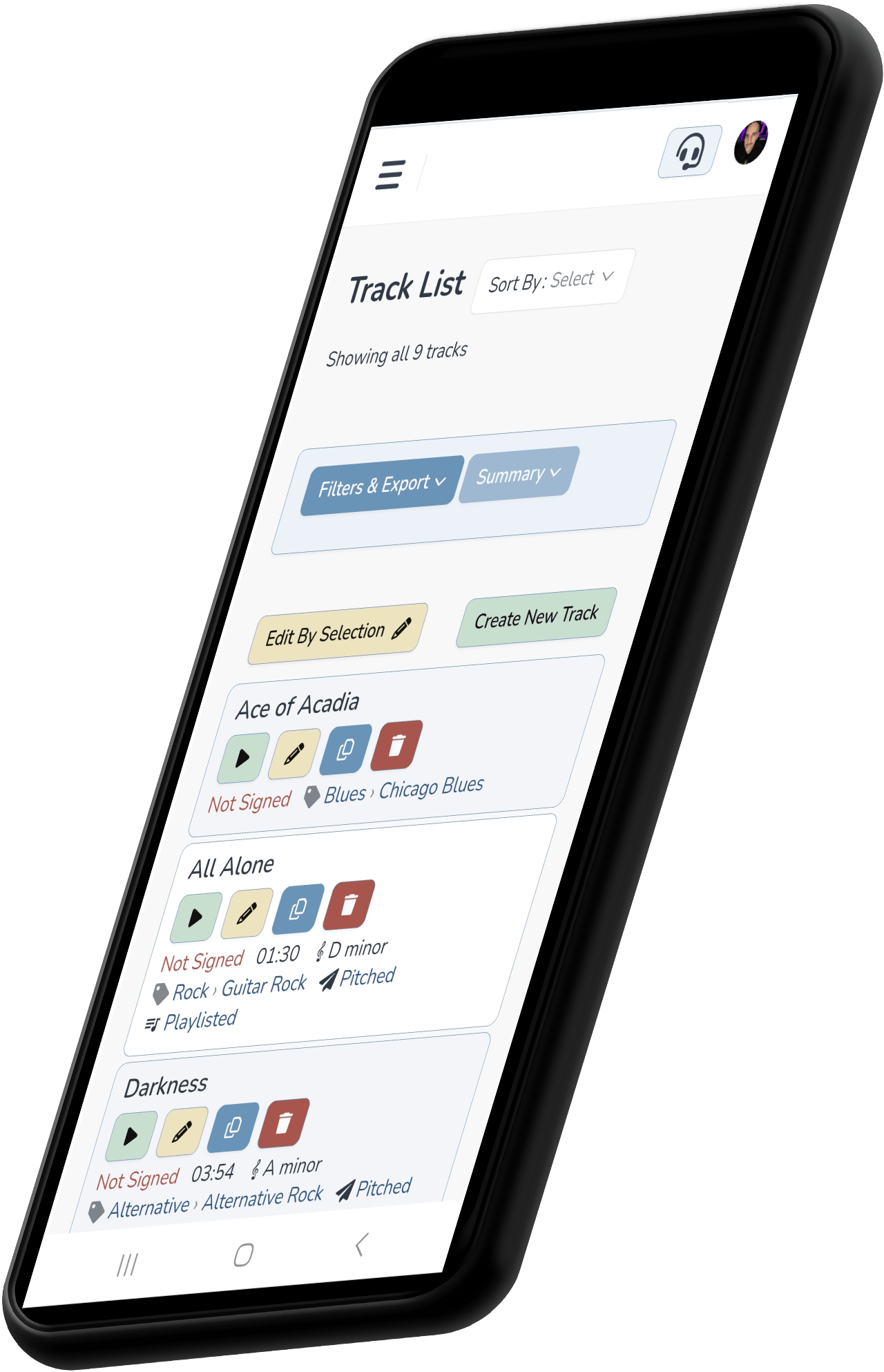
Mobile Ready
In a jam and need to know if that track is available in your library? Pull up Composer Catalog on your phone and make sure. In this industry, making mistakes can cost you relationships.
- Full database on desktop, tablet, or phone
- Search by any metadata field you've entered
- Export any search to PDF or Excel
How can Composer Catalog help you?
Organizational Tool
Composer Catalog is a music library organizational tool designed to help composers manage their catalogs. With advanced metadata tagging, you can perform complex searches and keep track of every aspect of a track—such as who wrote it, which publishers are attached, session musicians, band sound-alikes, and more. Finally take control of your catalog!
Know Your Library
With Composer Catalog, your tracks will be organized, and you’ll be able to instantly pull up detailed information about any track in your library. You’re no longer limited to basic search criteria like song title, BPM, or genre. Composer Catalog links advanced metadata to each track, allowing you to find unsigned tracks, sound-alikes, alternate titles, co-publishing deals, exclusive tracks, and more.
Metadata Tagging
Composer Catalog lets you tag every track with the detail that actually matters for sync — key, BPM, mood, sound-alikes, exclusivity status, reversion dates, and every writer or publisher attached. The more you tag, the more searchable your catalog becomes. When a publisher asks for something specific, you're not guessing which tracks qualify. Your metadata is your catalog's memory!
Pitching to Publishers & Supervisors
Composer Catalog turns a finished playlist into a professional, branded pitch — sent directly to a supervisor, publisher, or collaborator. Add your logo, images, and social links, then track exactly what happens next. Know the moment your pitch is opened, a track is streamed, or a file is downloaded. No more sending a link and wondering if anyone ever looked. Pitch with confidence, not guesswork!
Free Trial Plan
Try Composer Catalog for free! All features of the program are available during your trial. The only limitation is a maximum of ten tracks. Why not give it a spin and see if it’s the right fit for you? No credit card required!
Made by a Composer
Composer Catalog was created for writers, by a writer. As a composer for television and film, I needed a tool to help me manage my growing music library. Spreadsheets just weren’t cutting it. With music placed in thousands of TV shows, I needed all the help I could get—and that’s why I built Composer Catalog.
Is it difficult to upgrade from my desktop version?
Moving from the desktop version to the new online platform is smooth and hassle-free. Simply export your desktop database and drag it into the browser—the online version will automatically set everything up for you. You can also upload linked audio files and attach documents like contracts and work-for-hires to your tracks.
While the desktop version still works independently, the online version introduces a streamlined workflow and exciting new features. Since the focus will be on the online version, I will no longer have to deal with programming updates for a new Mac or PC operating system. Now that the application is online, you will be seeing faster additions and improvements in the future. Watch the video tutorial to view the video tutorial.
The Reviews Are In!
★★★★★
James Thacker
Kazen Music Group
★★★★★
"I've been using Composer Catalog for 10 years and I love it! It is essential for keeping track of all my music and managing metadata. The online version will make things even easier as I can access it from any of my devices. It's very user friendly, particularly with new features for searching and displaying information. I will continue to recommend it!"
F-M Cossey
Composer for TV & Film
★★★★★
Writing Production Music for TV - The Road to Success Book (00252427) by Hal Leonard
(author: Steve Barden)
★★★★★
"To be honest, one of the main reasons I signed up was because it has almost everything I was already tracking across multiple spreadsheets. Having one platform where I can keep track of everything instead of jumping between so many different spreadsheets is exactly what I was looking for."
Buddy Bangs
https://www.instagram.com/buddybangs/
★★★★★
Pat Waara
Pat Waara | Composer for TV & Film
★★★★★
Robbie Hancock
Sync or Swim Music
★★★★★
David Flavin
David Flavin - MUSIC FOR SPORT - Composer Team
★★★★★
"Composer Catalog has helped me become more organized. It is great to have all that info about my music in one place."
Lydia Ashton
Lydia Ashton | Composer for TV & Film
Documents
Terms of Service
Privacy Policy
Resources
Support
Update Log